System Architecture
WebMCP Auto-UI is built on a modular architecture centered around four fundamental concepts: the agentic loop, tool layers, the widget registry, and the reactive canvas. This page explains the why behind each architectural choice and shows how the pieces fit together.
Overall Architecture
Section titled “Overall Architecture”
The architecture breaks down into three zones:
- Frontend (Svelte 5): reactive canvas, widgets, chat panel, LLM selector.
- Agent engine (pure TypeScript): iterative loop, LLM providers, tool dispatcher.
- Tool servers: MCP (remote, via SSE) and WebMCP (local, in-browser).
The agent engine is intentionally framework-agnostic. It can run in a Web Worker, a Node.js server, or directly in the browser’s main thread.
Detailed Agentic Loop
Section titled “Detailed Agentic Loop”
The agent loop is implemented in runAgentLoop(). Here is how it works, step by step:
flowchart TD START([User prompt]) --> BUILD[Build system prompt<br/>+ discovery tools] BUILD --> LLM[Send to LLM<br/>messages + tools] LLM --> PARSE{Response contains<br/>tool_use?} PARSE -->|No| END_TEXT([Return text]) PARSE -->|Yes| DISPATCH[Dispatch each tool_use] DISPATCH --> PSEUDO{Pseudo-tool?<br/>list/search_tools} PSEUDO -->|Yes| LOCAL[Local response<br/>without touching server] PSEUDO -->|No| ACTIVATE{First call<br/>to this server?} ACTIVATE -->|Yes| LAZY[Activate all tools<br/>from server] ACTIVATE -->|No| EXEC[Execute tool] LAZY --> EXEC LOCAL --> COMPRESS[Compress old results] EXEC --> COMPRESS COMPRESS --> CHECK{max_iterations<br/>reached?} CHECK -->|No| LLM CHECK -->|Yes| END_MAX([End: limit reached])Why a loop instead of a single call? Because an agent needs to:
- Discover available tools (iteration 1)
- Load a recipe (iteration 2)
- Call the actual tool (iteration 3)
- Adjust the layout (iteration 4)
Each iteration enriches the context. Automatic compression (compressOldToolResults) prevents history from filling the context window.
LLM Providers
Section titled “LLM Providers”The @webmcp-auto-ui/agent package exposes three interchangeable providers. All implement the same interface:
interface LLMProvider { readonly name: string; readonly model: string; chat( messages: ChatMessage[], tools: ProviderTool[], options?: { signal?: AbortSignal; cacheEnabled?: boolean; system?: string; maxTokens?: number; temperature?: number; onToken?: (token: string) => void; } ): Promise<LLMResponse>;}This uniform interface lets you swap providers without modifying agent code. The choice of provider is a runtime decision, not an architectural one.
RemoteLLMProvider (Remote LLM)
Section titled “RemoteLLMProvider (Remote LLM)”Provider for any OpenAI-compatible API (e.g. Claude/Anthropic, Gemini/Google, ChatGPT/OpenAI, Le Chat/Mistral, Qwen) via an HTTP proxy. The proxy is a SvelteKit endpoint (/api/chat) that adds the API key server-side:
import { RemoteLLMProvider } from '@webmcp-auto-ui/agent';
const provider = new RemoteLLMProvider({  proxyUrl: '/api/chat',});
// Switch models on the flyprovider.setModel('haiku');   // Fast, cost-effectiveprovider.setModel('sonnet');  // Balancedprovider.setModel('opus');    // Deep reasoning
Why a proxy? To keep the API key off the browser. The proxy adds the appropriate authorization header before relaying the request to the LLM provider API.
WasmProvider (Gemma 4 LiteRT)
Section titled “WasmProvider (Gemma 4 LiteRT)”In-browser provider using Gemma 4 via the LiteRT runtime. The model runs entirely in the browser with no network calls:
import { WasmProvider } from '@webmcp-auto-ui/agent';
const provider = new WasmProvider({  model: 'gemma-e2b',       // 2B parameters  contextSize: 32_768,  onProgress: (progress, status, loaded, total) => {    // Show download progress  },  onStatusChange: (status) => {    // 'idle' | 'loading' | 'ready' | 'error'  },});
await provider.initialize();| Variant | Parameters | Context | Use Case |
|---|---|---|---|
gemma-e2b | 2B | 32K | Fast, good for demos |
gemma-e4b | 4B | 32K | More capable, requires more RAM |
WasmProvider natively supports Gemma’s <|tool_call|> format for tool calling without an intermediary. The parser detects this format and converts it to tool_use blocks compatible with the agent loop.
LocalLLMProvider (Ollama)
Section titled “LocalLLMProvider (Ollama)”Provider for local models via Ollama. Useful for offline development or models not supported by the other providers:
import { LocalLLMProvider } from '@webmcp-auto-ui/agent';
const provider = new LocalLLMProvider({  backend: 'ollama',  model: 'llama3.2',  baseUrl: 'http://localhost:11434',});
Factory
Section titled “Factory”createProvider instantiates the right provider based on configuration:
import { createProvider } from '@webmcp-auto-ui/agent';
const claude = createProvider({ type: 'remote', model: 'sonnet', proxyUrl: '/api/chat' });const gemma = createProvider({ type: 'wasm', model: 'gemma-e4b' });const ollama = createProvider({ type: 'local', model: 'llama3.2', baseUrl: 'http://localhost:11434' });
<LLMSelector> Component
Section titled “<LLMSelector> Component”The selector unifies all three providers in a single Svelte UI component. It displays available models and handles Gemma loading via <ModelLoader>:
<script>  import { LLMSelector, ModelLoader } from '@webmcp-auto-ui/ui';
  let selectedModel = $state('sonnet');</script>
<LLMSelector bind:value={selectedModel} />{#if selectedModel.startsWith('gemma')}  <ModelLoader model={selectedModel} />{/if}
Tool Layers
Section titled “Tool Layers”Each layer represents a server (MCP or WebMCP). This abstraction lets the dispatcher route calls transparently regardless of protocol.
interface ToolLayer { protocol: 'mcp' | 'webmcp'; serverName: string; description?: string; tools: WebMcpToolDef[] | McpToolDef[];}graph TB subgraph "Tool Layers" L1["Layer 1: autoui (WebMCP)<br/>widget_display, canvas, recall"] L2["Layer 2: weather (MCP)<br/>get_forecast, list_cities"] L3["Layer 3: database (MCP)<br/>query, list_tables"] end
subgraph "Dispatcher" D[Prefix-based routing] end
L1 --> D L2 --> D L3 --> D
D -->|webmcp| LOCAL[Local execution] D -->|mcp| REMOTE[Network call via SSE]Why layers? To discover tools progressively. Instead of loading hundreds of tools at startup (which would saturate the LLM context), each layer is activated on demand.
Phase 1: Discovery (Startup)
Section titled “Phase 1: Discovery (Startup)”At launch, only discovery tools are available:
const discoveryTools = buildDiscoveryToolsWithAliases(layers);These tools let the agent explore what is available without activating servers:
| Tool | Role |
|---|---|
{server}_{proto}_search_recipes(query) | Search for a recipe by keyword |
{server}_{proto}_list_recipes() | List all recipes |
{server}_{proto}_get_recipe(name) | Load a full recipe (schema, examples) |
{server}_{proto}_search_tools(query) | Search for a tool by name or description |
{server}_{proto}_list_tools() | List a server’s tools |
Phase 2: Activation (Lazy Loading)
Section titled “Phase 2: Activation (Lazy Loading)”When the agent calls a real (non-discovery) tool for the first time:
if (!activatedServers.has(serverKey)) { activatedServers.add(serverKey); const layer = layers.find(l => l.serverName === serverName); activeTools = activateServerTools(activeTools, layer); // All server tools become available}Activation is irreversible within a session: once a server is activated, all its tools remain available until the conversation ends.
Phase 3: Canonical Tool Resolution (4-Layer Matching)
Section titled “Phase 3: Canonical Tool Resolution (4-Layer Matching)”For MCP servers, tool names are unpredictable (each server names its tools differently). The canonical resolver normalizes these names through 4 layers:

Layer 1 — Exact name: The tool is called search_recipes? Direct match.
Layer 2 — Token decomposition: The tool is called find_recipe_by_keyword?
tokens: ["find", "recipe", "by", "keyword"]→ test pairs: (find, recipe) → SEARCH + RECIPE = "search_recipes" ✓Layer 3 — Description keywords: The description contains “template” or “library”? Map to list_recipes.
Layer 4 — Fallback: No match. The tool is used as-is, without alias.
Aliasing and Transparent Dispatch
Section titled “Aliasing and Transparent Dispatch”Aliases are stored in a local map and used on every call:
const { prompt, aliasMap } = buildSystemPromptWithAliases(layers);// aliasMap: {//   "myserver_mcp_search_recipes" → "myserver_mcp_find_recipes_by_keyword"// }
// In the dispatcher:const resolvedName = aliasMap.get(toolName) ?? toolName;
The agent sees normalized names (search_recipes), but the dispatcher calls the actual MCP server names. This indirection makes the system prompt stable regardless of the server’s naming convention.
Widget Registry (WebMCP)
Section titled “Widget Registry (WebMCP)”A WebMCP server exposes widgets and rendering tools. The built-in autoui server manages the 30+ native widgets:
import { createWebMcpServer } from '@webmcp-auto-ui/core';
const autoui = createWebMcpServer('autoui', {  description: 'Built-in UI widgets'});
// Register a widget via a markdown recipe with frontmatterautoui.registerWidget(`---widget: statdescription: Key statistic (KPI, counter)schema:  type: object  required: [label, value]  properties:    label: { type: string }    value: { type: string }    trend: { type: string, enum: [up, down, stable] }---## How to useCall widget_display('stat', {label: "X", value: "Y"})`, vanillaStatRenderer);
The recipe contains two things:
- Frontmatter: JSON Schema, description, widget name.
- Markdown body: natural language instructions for the agent.
The agent reads the body to understand when and how to use the widget. The schema ensures parameters are valid.
Built-in autoui Tools
Section titled “Built-in autoui Tools”| Tool | Role |
|---|---|
widget_display(name, params) | Display a widget on the canvas |
canvas(action, id, params) | Manipulate widgets (move, resize, style, update, clear) |
recall(id) | Re-read a compressed result |
System Prompt Construction
Section titled “System Prompt Construction”The system prompt is dynamically built from the tool layers. It guides the agent step by step:
STEP 1 — Recipe search: search_recipes(query)STEP 1b — Recipe listing: list_recipes()STEP 1c — Tool search: search_tools(query)STEP 1d — Tool listing: list_tools()STEP 2 — Recipe reading: get_recipe(name)STEP 3 — Execution: call the tool with the right parametersSTEP 4 — UI display: widget_display(name, params), canvas(action, ...)Why structure the prompt in steps? To enforce predictable behavior. Without these instructions, LLMs tend to hallucinate tool names or jump straight to execution without discovering the schema. The steps enforce: discovery -> reading -> execution -> rendering.
Reactive Canvas (Svelte 5)
Section titled “Reactive Canvas (Svelte 5)”The canvas is a reactive store with centralized state management:
Dual-Store Architecture
Section titled “Dual-Store Architecture”graph LR VANILLA["Vanilla store<br/>(framework-agnostic)"] SVELTE["Svelte 5 wrapper<br/>($state + $derived)"] AGENT["Agent callbacks<br/>(onWidget, onMove...)"]
AGENT --> VANILLA VANILLA -->|notify| SVELTE SVELTE -->|render| DOM[DOM]Two layers work together:
Vanilla store (createCanvasVanilla()): a plain JavaScript object with a pub/sub pattern. Framework-agnostic, can run in a Worker or a Node.js server.
const canvasVanilla = createCanvasVanilla();canvasVanilla.addWidget('stat', { label: 'Visitors', value: '1,234' });// → triggers notify() → all listeners receive the changeSvelte 5 wrapper (createCanvas()): subscribes to the vanilla store and exposes data via $state. Every vanilla store mutation automatically propagates through the Svelte component tree.
const canvas = createCanvas();// canvas.blocks is a $state that mirrors canvasVanilla.blocks// Every add/remove/update propagates automaticallyWhy two layers? To support vanilla rendering (mountWidget() in @webmcp-auto-ui/core) without depending on Svelte. The vanilla store is the source of truth; Svelte is one view among several.
FONC Message Bus
Section titled “FONC Message Bus”For inter-component communication without tight coupling:
import { bus } from '@webmcp-auto-ui/ui';
// Emit an eventbus.broadcast('widget_sales', 'data-update', { newValue: 42 });
// Listen for an event typebus.subscribe(['data-update'], (msg) => {  console.log('Received from', msg.from, ':', msg.payload);});
// Visually link widgets (SVG arrows)bus.link(['widget_1', 'widget_2', 'widget_3'], 'group_sales');
The FONC (Functions Over Networked Components) bus lets widgets communicate without knowing about each other. A chart widget can listen to updates from a data-table widget without a direct import.
History Compression and Recall
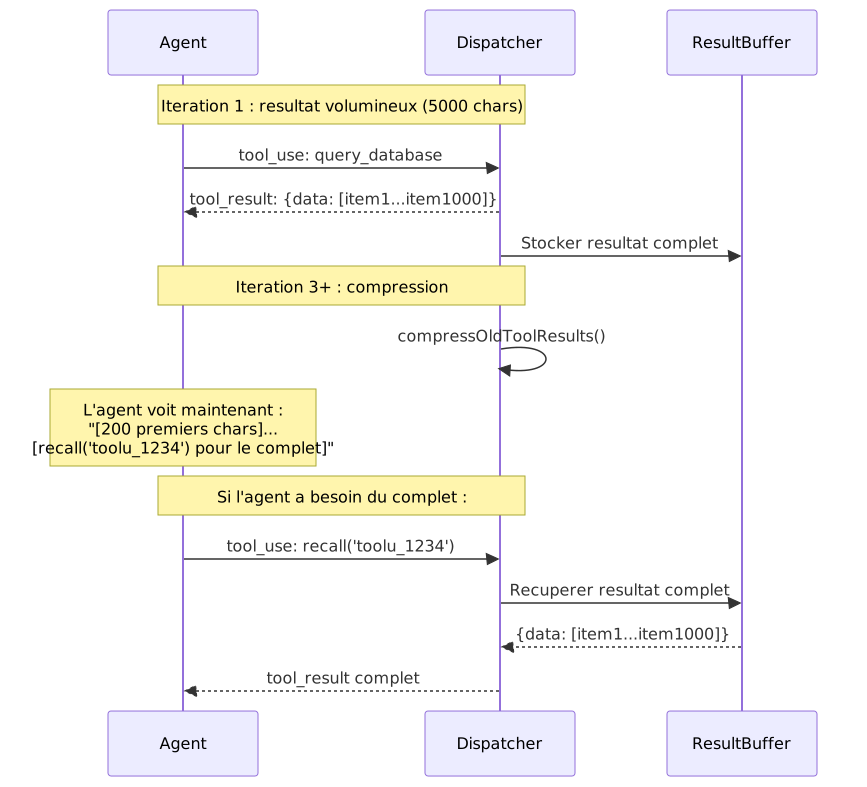
Section titled “History Compression and Recall”To save LLM context, old tool results are automatically compressed:
sequenceDiagram    participant A as Agent    participant D as Dispatcher    participant B as ResultBuffer
    Note over A,D: Iteration 1: large result (5000 chars)    A->>D: tool_use: query_database    D-->>A: tool_result: {data: [item1...item1000]}    D->>B: Store full result
    Note over A,D: Iteration 3+: compression    D->>D: compressOldToolResults()    Note over A: Agent now sees:<br/>"[first 200 chars]...<br/>[recall('toolu_1234') for full result]"
    Note over A,D: If agent needs the full result:    A->>D: tool_use: recall('toolu_1234')    D->>B: Retrieve full result    B-->>D: {data: [item1...item1000]}    D-->>A: Complete tool_result
This mechanism is transparent to the agent. It sees a truncated result with a recall() hint, and can choose to re-read it or continue with the preview.
widget_display Flow
Section titled “widget_display Flow”
The full flow of a widget_display call:
- Reception: the dispatcher receives the
tool_useblock with the widget name and parameters. - Resolution: the widget registry finds the matching definition.
- Validation: parameters are validated against the widget’s JSON Schema. If validation fails, the agent receives the expected schema and can retry.
- Sanitization: image URLs are checked (no oversized
data:, no malicious URLs). - ID generation: a unique identifier
w_xxxxxxis generated. - Callback:
onWidget(type, data)is called, adding the widget to the canvas store. - Rendering: the Svelte
WidgetRendererdetects the new widget and mounts the corresponding component.
Architectural Summary
Section titled “Architectural Summary”| Component | Responsibility | Package |
|---|---|---|
| Agent Loop | Iterative LLM -> tools -> LLM loop | agent |
| LLM Providers | Remote (any OpenAI-compatible API), Gemma 4 (WASM), Ollama (local) | agent |
| Tool Layers | MCP + WebMCP tool structuring and discovery | agent |
| Dispatcher | Prefix-based routing + lazy activation | agent |
| Tool Resolver | 4-layer canonical matching | agent |
| System Prompt | Structured instructions + tool listing | agent |
| Canvas Store | Centralized widget state (vanilla + Svelte) | sdk |
| FONC Bus | Event-based inter-component communication | ui |
| Compression | Context savings + recall | agent |
| Widget Registry | Discovery, schema validation, markdown recipes | core + agent |
| WidgetRenderer | Component dispatch and mounting | ui |
| HyperSkills | Canvas serialization/deserialization to URL | sdk |
| Nano-RAG | Context compaction via embeddings | agent |
Why WebMCP and not just MCP?
Section titled “Why WebMCP and not just MCP?”MCP is a network protocol: a server exposes tools via HTTP/SSE, and a client calls them remotely. WebMCP is a local complement that runs in the browser. It handles widgets and UI actions that do not need network access.
Why Svelte 5?
Section titled “Why Svelte 5?”Svelte 5 (runes) offers fine-grained reactivity without a virtual DOM. For a canvas with 30+ widgets updating in real time, performance matters. Runes ($state, $derived, $effect) provide precise control over reactivity.
Why three LLM providers?
Section titled “Why three LLM providers?”Each provider addresses a different use case:
- Remote (e.g. Claude, Gemini, ChatGPT): maximum quality, requires an API key and internet connection.
- Gemma: total privacy (everything runs in the browser), no API key needed.
- Ollama: local models for offline development or custom models.
How do I add a new widget?
Section titled “How do I add a new widget?”Write a markdown recipe with frontmatter (JSON Schema) and register it on the WebMCP server with autoui.registerWidget(). No changes to agent code required.